

Running Panel apps inside Django#
Panel generally runs on the Bokeh server, which itself runs on Tornado. However, it is also often useful to embed a Panel app in a larger web application, such as a Django project.
Since Panel 1.10.0 Panel serves its applications on its own ASGI application, which it composes with the ASGI application of the Django project. Panel handles the requests for the applications, their websockets and their resources and hands every other request to Django, so neither channels nor bokeh-django are needed anymore. If you are migrating from bokeh-django see the migration section below.
Setup#
Install Django and an ASGI server, e.g. uvicorn:
pip install panel[django]
conda install -c conda-forge django uvicorn panel
and add panel.io.django to the INSTALLED_APPS in the project’s settings.py:
INSTALLED_APPS = [
    'panel.io.django',
    'django.contrib.admin',
    ...
]
Panel serves its applications on the project’s ASGI application, but Django’s own development server is WSGI only, so it would serve the Django views and 404 on everything the Panel applications need. The panel.io.django app exists to replace runserver with an equivalent command that runs the ASGI application under uvicorn. It has to be listed before django.contrib.staticfiles, which ships a runserver command of its own, because Django resolves management commands in INSTALLED_APPS order.
Important
If you cannot add panel.io.django to the INSTALLED_APPS, run the project with an ASGI server directly, e.g. uvicorn project.asgi:application. Plain python manage.py runserver is WSGI only and will serve the Django views but not the Panel applications.
Configuration#
The examples below build the project in examples/apps/django, which serves a single Panel application embedded in a Django view.
All the configuration happens in the project’s asgi.py, i.e. examples/apps/django/project/asgi.py:
import os

import django

os.environ.setdefault('DJANGO_SETTINGS_MODULE', 'project.settings')

django.setup()

import sliders.pn_app as sliders_app

from panel.io.django import autoload, get_asgi_application

application = get_asgi_application([
    autoload('sliders', sliders_app.app),
])
django.setup() is called before the application modules are imported so that they can use the Django ORM and anything else that requires the project to be configured.
Each application is declared with one of two helpers:
document(url, app)serves the rendered application on the URL itself, i.e. Panel renders the whole page.autoload(url, app)serves the application for embedding in a Django view, i.e. it is served on<url>/autoload.jsand Django renders the page.
An application can be a function that modifies a Bokeh Document, an already built Application or the path to an application script, notebook or markdown file. To serve every application in a directory use directory('path/to/apps'), which returns a list of document routings.
In the settings.py all that is needed is that the ASGI_APPLICATION points at the application we just declared:
ASGI_APPLICATION = 'project.asgi.application'
Panel serves the BokehJS and extension resources itself, so nothing has to be added to STATICFILES_DIRS. To let Django serve the static files of the project itself during development add its own static routes in urls.py:
from django.contrib import admin
from django.contrib.staticfiles.urls import staticfiles_urlpatterns
from django.urls import include, path

urlpatterns = [
    path('sliders/', include('sliders.urls')),
    path('admin/', admin.site.urls),
]

urlpatterns += staticfiles_urlpatterns()
Since the sliders application is declared with autoload, the /sliders/ URL is rendered by a Django view, which means we also have to declare the template directory in settings.py:
TEMPLATES = [
    {
        'DIRS': [os.path.join(BASE_DIR, 'sliders', 'templates')],
        ...: ...,
    }
]
Now it’s time to configure an actual app and add it to our Django server.
Sliders app#
Based on a standard Django app template, this app shows how to integrate Panel with a Django view.
The sliders app is in examples/apps/django/sliders. We will cover the following additions/modifications to the Django app template:
sliders/sinewave.py: a parameterized object (representing your pre-existing code)sliders/pn_app.py: creates an app function from the SineWave classsliders/views.pyandtemplates/base.html: getting the Panel app into a Django view
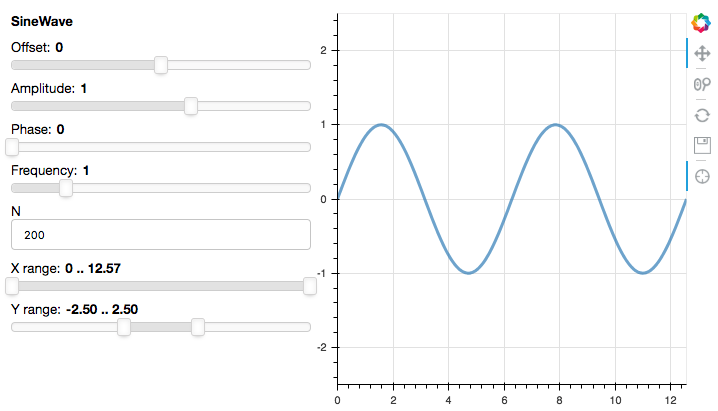
To start with, in sliders/sinewave.py we create a parameterized object to serve as a placeholder for your own, existing code:
import numpy as np
import param

from bokeh.models import ColumnDataSource
from bokeh.plotting import figure


class SineWave(param.Parameterized):
    offset = param.Number(default=0.0, bounds=(-5.0, 5.0))
    amplitude = param.Number(default=1.0, bounds=(-5.0, 5.0))
    phase = param.Number(default=0.0, bounds=(0.0, 2 * np.pi))
    frequency = param.Number(default=1.0, bounds=(0.1, 5.1))
    N = param.Integer(default=200, bounds=(0, None))
    x_range = param.Range(default=(0, 4 * np.pi), bounds=(0, 4 * np.pi))
    y_range = param.Range(default=(-2.5, 2.5), bounds=(-10, 10))

    def __init__(self, **params):
        super().__init__(**params)
        x, y = self.sine()
        self.cds = ColumnDataSource(data=dict(x=x, y=y))
        self.plot = figure(height=400, width=400,
                           tools="crosshair, pan, reset, save, wheel_zoom",
                           x_range=self.x_range, y_range=self.y_range)
        self.plot.line('x', 'y', source=self.cds, line_width=3, line_alpha=0.6)

    @param.depends('N', 'frequency', 'amplitude', 'offset', 'phase', 'x_range', 'y_range', watch=True)
    def update_plot(self):
        x, y = self.sine()
        self.cds.data = dict(x=x, y=y)
        self.plot.x_range.start, self.plot.x_range.end = self.x_range
        self.plot.y_range.start, self.plot.y_range.end = self.y_range

    def sine(self):
        x = np.linspace(0, 4 * np.pi, self.N)
        y = self.amplitude * np.sin(self.frequency * x + self.phase) + self.offset
        return x, y
However the app itself is defined we need to configure an entry point, which is a function that accepts a Bokeh Document and adds the application to it. In case of the slider app it looks like this:
import panel as pn

from .sinewave import SineWave

def app(doc):
    sw = SineWave()
    row = pn.ui.Row(sw.param, sw.plot)
    row.server_doc(doc)
Next we create a views.py file which returns a view the Django server can render:
# Create your views here.
from bokeh.embed import server_document
from django.http import HttpRequest, HttpResponse
from django.shortcuts import render


def sliders(request: HttpRequest) -> HttpResponse:
    script = server_document(request.build_absolute_uri())
    return render(request, "base.html", dict(script=script))
The base.html template should be in the TEMPLATES DIRS directory we declared in the settings.py file above. A very basic template might look like this but can be as complex as you need:
<!DOCTYPE html>
<html>
  <head>
    <title>Panel in Django: sliders</title>
  </head>
  <body>
  {% block content %}
    {{ script|safe }}
  {% endblock %}
  </body>
</html>
Next we declare a urls.py file to declare the urlpattern where to serve the sliders app to Django:
from django.urls import path

from . import views

app_name = 'sliders'
urlpatterns = [
    path('', views.sliders, name='sliders'),
]
Running the project#
With panel.io.django in the INSTALLED_APPS the usual command runs the project:
python manage.py runserver
This is Django’s runserver with its WSGI server swapped for uvicorn serving ASGI_APPLICATION, so the address argument, the system checks, --noreload and the autoreload on code changes all behave as they always did. Pass --wsgi to fall back to Django’s own development server, which is occasionally useful to confirm that a problem is not in Panel, keeping in mind that the Panel applications are not served then.
In production run the ASGI application with an ASGI server of your choice, e.g.:
uvicorn project.asgi:application
You should be able to run the sliders app yourself by changing to the examples/apps/django directory and running either command; then visit http://localhost:8000/sliders in your browser to try the app.
Accessing the request and the URL parameters#
An application function is called with the Bokeh Document only. To get the request that created the session as well wrap it in with_request:
from panel.io.django import document, with_request

def app(doc, request):
    name = request.arguments.get('name', [b'world'])[0].decode()
    pn.panel(f'Hello {name}').server_doc(doc)

application = get_asgi_application([document('hello', with_request(app))])
The request exposes the arguments, cookies and headers of the request that created the session, the same object pn.state.headers and pn.state.cookies read from.
Applications can also be served on routes with parameters, which are declared as {name} templates and passed to the function by with_url_args:
from panel.io.django import document, with_url_args

def app(doc, name):
    pn.panel(f'Hello {name}').server_doc(doc)

application = get_asgi_application([document('hello/{name}', with_url_args(app))])
The parameters are also available as pn.state.route_params anywhere inside the application.
Authentication#
Panel’s own authentication works here as it does everywhere else, i.e. pass the authentication arguments to get_asgi_application:
application = get_asgi_application(
    [document('sliders', sliders_app.app)],
    basic_auth='my-password',
    cookie_secret='a-secret'
)
If you would rather authenticate with Django, e.g. because the project already has its own login, use pn.state.headers and pn.state.cookies in an authorization callback or hand the request to Django’s session machinery.
Multiple apps#
Multiple applications are declared by passing more routings, e.g.:
application = get_asgi_application([
    autoload('sliders', sliders_app.app),
    autoload('gbm', gbm_app.app),
    autoload('stockscreener', stockscreener_app.app),
])
To see a multi-app Django project have a look at examples/apps/django_multi_apps and launch it with python manage.py runserver.
Migrating from bokeh-django#
Projects that served Panel applications with channels and bokeh-django need the following changes:
Remove
channels,daphneandbokeh_djangofrom the requirements and fromINSTALLED_APPS, and addpanel.io.djangoin their place. Likechannelsanddaphneit takes overrunserver, so it goes at the top of the list.Delete
routing.py, i.e. theProtocolTypeRouterand thebokeh_app_config.routespatterns, and declare the applications inasgi.pywithpanel.io.django.get_asgi_applicationas shown above. PointASGI_APPLICATIONat it.Import
document,autoload,directory,with_requestandwith_url_argsfrompanel.io.djangoinstead ofbokeh_django. Their signatures are unchanged, butwith_requestnow hands the application the request of the session rather than the Django request, i.e. itsarguments,cookiesandheaders, andwith_url_argspasses the captured route parameters as keyword arguments only.Remove the
bokeh_appslist fromurls.pyas well as thestatic_extensions()urlpatterns andSTATICFILES_DIRS = [bokehjs_path()], since Panel serves the BokehJS and extension resources itself.panel.io.django.static_extensions()and thePanelExtensionFinderstaticfiles finder are still available if you prefer Django to serve them, e.g. after acollectstatic.Declare routes that captured parameters as
{name}templates rather than as regular expressions, e.g.document(r'^user/(?P<name>[\w-]+)$', app)becomesdocument('user/{name}', app). The regular expression form still works but logs a warning.Deploy the project with an ASGI server, e.g.
uvicorn project.asgi:application, rather than a WSGI one.manage.py runserverkeeps working in development as long aspanel.io.djangois installed.
routing.RoutingConfiguration, DjangoBokehConfig and the Channels consumers (DocConsumer, AutoloadJsConsumer, WSConsumer) no longer exist and raise an error pointing at the new API.
Note
Applications declared as a function are initialized on a worker thread, so they can use the Django ORM directly. Applications loaded from a script, notebook or markdown file are initialized on the event loop, where Django rejects synchronous ORM access, so wrap it in asgiref.sync.sync_to_async there. The same applies to async callbacks on either kind of application.
