Skip to content

Building a Census Data AI Explorer

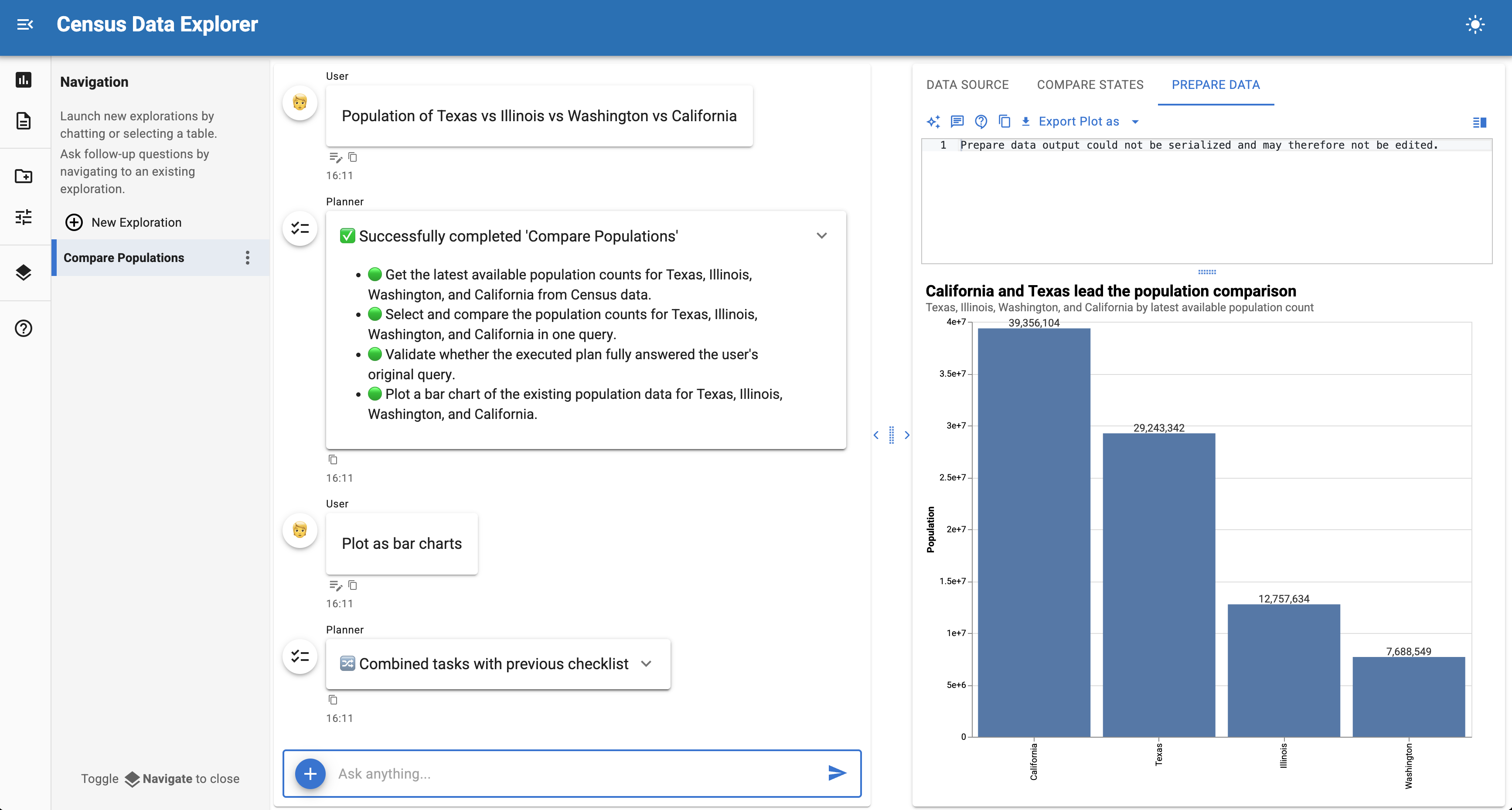
Census Data Explorer UI

Build a data exploration application that integrates U.S. Census Bureau data using Lumen AI.

This tutorial creates a custom source control that lets you fetch demographic data through a simple interface with reactive options that update based on your selections.

Final result

A chat interface that can fetch and analyze U.S. Census data with controls for selecting datasets, years, variable groups, and geographies.

Time: 15-20 minutes

What you'll build

A custom source control that integrates with the Census API and lets users explore demographic data through natural language queries. The tutorial follows three steps:

  1. Start with a minimal example - Use CodeSourceControls to wrap Census functions with ~40 lines
  2. Understand the components - Learn how CodeSourceControls introspects function signatures
  3. Add reactive options - Subclass to add dynamic dropdowns that update based on dataset/year selection

For a detailed reference on creating custom controls, see the Source Controls documentation.

Why this tutorial?

Lumen AI has built-in support for many data formats, but some data lives behind APIs that require specific parameters or dynamic filtering. By building a custom Source Control, you can:

  • Connect to external APIs (like the U.S. Census Bureau)
  • Add interactive parameters for users to select subsets of data
  • Expose data to LLM agents so they can answer questions about it immediately

Prerequisites

Install the required packages:

pip install lumen-ai censusdis

1. Minimal example with CodeSourceControls

The simplest approach wraps standalone functions with CodeSourceControls. Copy this to census_explorer.py and run with panel serve census_explorer.py --show:

census_explorer.py
import pandas as pd
import param

import lumen.ai as lmai
from lumen.ai.agents import SourceAgent
from lumen.ai.controls import CodeSourceControls, UploadSourceControls


def download_census_data(
    dataset: str = "acs/acs5",
    vintage: int = 2022,
    state: str = "*",
    group: str = "B01003",
) -> pd.DataFrame:
    """
    Download Census data for US geographies.

    Args:
        dataset: Census dataset (e.g., "acs/acs5" for ACS 5-year).
        vintage: Year of data (e.g., 2022).
        state: State FIPS code or "*" for all states.
        group: Variable group code (e.g., "B01003" for total population).
    """
    import censusdis.data as ced

    return ced.download(
        dataset=dataset,
        vintage=vintage,
        download_variables=["NAME"],
        group=group,
        state=state,
    )


ui = lmai.ExplorerUI(
    agents=[SourceAgent()],
    source_controls=[
        CodeSourceControls(
            functions={"Download Census Data": download_census_data},
            param_overrides={
                "Download Census Data": {
                    "dataset": param.Selector(
                        default="acs/acs5",
                        objects=["acs/acs5", "acs/acs1", "dec/pl"],
                    ),
                    "vintage": param.Selector(
                        default=2022,
                        objects=[2022, 2021, 2020, 2019, 2018],
                    ),
                },
            },
            table_name="census_data",
        ),
        UploadSourceControls(),
    ],
    title="Census Data Explorer",
)

ui.servable()

This ~55 line example is immediately runnable. Click "Sources" in the sidebar, select options, and click "Fetch Data".

Once the data loads, ask questions like:

  • "What is the total population?"
  • "Show me the top 10 states by population"
  • "Which state has the smallest population?"

2. Understanding CodeSourceControls

CodeSourceControls wraps Python functions as data sources:

  1. Function signature → widgets: Parameters become UI controls automatically
  2. Docstring → agent context: The LLM uses your docstring to understand when to call the function
  3. Return value → table: DataFrames are registered as queryable tables

How param_overrides works

By default, CodeSourceControls infers widget types from function annotations: - str → text input - int → number input - bool → checkbox

Use param_overrides to replace with richer widgets:

param_overrides={
    "Download Census Data": {
        # Full replacement with Selector dropdown
        "dataset": param.Selector(default="acs/acs5", objects=[...]),
        # Dict merge to modify existing param
        "vintage": {"default": 2023, "bounds": (2010, 2023)},
    },
}

3. Adding reactive options

The minimal example has static dropdowns — the same choices appear regardless of what the user selects. But Census variable groups depend on the dataset and year. Selecting ACS 2022 vs 2018 may offer different groups, and the dropdown should reflect that.

Subclass CodeSourceControls to make the group dropdown update automatically when the dataset or year changes.

The goal

When a user switches the dataset from acs/acs5 to acs/acs1, the group dropdown should fetch the available variable groups for that dataset and repopulate itself, without the user needing to reload the page or click anything extra.

Step by step

Override _setup_actions() to add watchers. _setup_actions() is called after the base class creates the internal _action_models dictionary — one Parameterized object per registered function. Override it to attach param.watch callbacks that fire when specific parameters change:

census_explorer_reactive.py
import pandas as pd
import param

import lumen.ai as lmai
from lumen.ai.agents import SourceAgent
from lumen.ai.controls import CodeSourceControls, UploadSourceControls


def download_census_data(
    dataset: str = "acs/acs5",
    vintage: int = 2022,
    state: str = "*",
    group: str = "B01003",
) -> pd.DataFrame:
    """Download Census data for US geographies."""
    import censusdis.data as ced

    return ced.download(
        dataset=dataset,
        vintage=vintage,
        download_variables=["NAME"],
        group=group,
        state=state,
    )


class CensusdisControls(CodeSourceControls):
    """Census controls with reactive group options."""

    label = '<span class="material-icons">assessment</span> Census Data'

    def __init__(self, **params):
        self._groups_cache = {}  # (1)!
        super().__init__(**params)

    def _setup_actions(self):
        super()._setup_actions()  # (2)!

        model = self._action_models.get("Download Census Data")  # (3)!
        if model:
            model.param.watch(  # (4)!
                self._on_dataset_vintage_change, ["dataset", "vintage"]
            )
            self._update_group_options(model)  # (5)!

    def _on_dataset_vintage_change(self, event):
        model = self._action_models["Download Census Data"]
        self._update_group_options(model)

    def _update_group_options(self, model):
        """Fetch and update group options based on current dataset/vintage."""
        groups = self._fetch_groups(model.dataset, model.vintage)
        current = model.group
        model.param.group.objects = list(groups.keys())  # (6)!
        # Preserve selection if still valid
        if current in groups:
            model.group = current
        elif groups:
            model.group = list(groups.keys())[0]

    def _fetch_groups(self, dataset: str, vintage: int) -> dict:
        """Fetch variable groups from Census API with caching."""
        import censusdis.data as ced

        key = (dataset, vintage)
        if key not in self._groups_cache:  # (7)!
            try:
                groups_df = ced.variables.all_groups(dataset, vintage)
                self._groups_cache[key] = {
                    row["GROUP"]: row["DESCRIPTION"]
                    for _, row in groups_df.iterrows()
                }
            except Exception:
                self._groups_cache[key] = {"B01003": "Total Population"}
        return self._groups_cache[key]
  1. Initialize the cache before super().__init__(), because the base class calls _setup_actions() during init
  2. Always call super()._setup_actions() first — this creates _action_models from the functions you registered
  3. _action_models is a dict mapping action display names to Parameterized objects. Each object has one param attribute per function argument.
  4. param.watch calls _on_dataset_vintage_change whenever dataset or vintage changes
  5. Populate the group dropdown immediately so it has valid options on first render
  6. Setting .objects on a Selector param updates the dropdown choices in the UI
  7. Cache API responses to avoid fetching the same group list repeatedly

How the pieces connect

The reactive flow has four participants:

Component Role
_action_models["Download Census Data"] Parameterized object holding current widget values
param.watch(callback, ["dataset", "vintage"]) Fires callback whenever dataset or vintage changes
_update_group_options(model) Fetches groups for the current dataset/vintage and sets model.param.group.objects
_fetch_groups(dataset, vintage) Calls the Census API (or returns a cached result)

When a user selects a different dataset in the dropdown, param.watch fires. The callback fetches the available variable groups for that dataset/year combination and replaces the group dropdown's options. If the user's current group selection is still valid, it stays selected; otherwise the dropdown resets to the first option.

Why cache API responses

Census API calls can be slow — fetching the full list of variable groups for a dataset/vintage combination may take a few seconds. Without caching, every switch between datasets would trigger a network request, even if the user switches back to a dataset they already visited.

The _groups_cache dictionary uses (dataset, vintage) tuples as keys:

# First call for ("acs/acs5", 2022): fetches from API, stores result
groups = self._fetch_groups("acs/acs5", 2022)

# Second call for ("acs/acs5", 2022): returns cached result immediately
groups = self._fetch_groups("acs/acs5", 2022)

# First call for ("acs/acs1", 2022): different key, fetches from API
groups = self._fetch_groups("acs/acs1", 2022)

Why initialize the cache before super().__init__()

CodeSourceControls.__init__ calls _setup_actions() during initialization. If _setup_actions() tries to access self._groups_cache before it exists, you'll get an AttributeError. Setting self._groups_cache = {} before calling super().__init__() avoids this:

def __init__(self, **params):
    self._groups_cache = {}    # ← must come first
    super().__init__(**params)  # ← calls _setup_actions() → _fetch_groups()

Wire up the application

Pass CensusdisControls to ExplorerUI with the same param_overrides as before, but add group as a Selector so it can receive dynamic options:

census_explorer_reactive.py
ui = lmai.ExplorerUI(
    agents=[SourceAgent()],
    source_controls=[
        CensusdisControls(
            functions={"Download Census Data": download_census_data},
            param_overrides={
                "Download Census Data": {
                    "dataset": param.Selector(
                        default="acs/acs5",
                        objects=["acs/acs5", "acs/acs1"],
                    ),
                    "vintage": param.Selector(
                        default=2022,
                        objects=[2022, 2021, 2020, 2019, 2018],
                    ),
                    "group": param.Selector(
                        default="B01003",
                        objects=["B01003"],  # Placeholder — replaced by _setup_actions
                    ),
                },
            },
            table_name="census_data",
        ),
        UploadSourceControls(),
    ],
    title="Census Data Explorer",
)

ui.servable()

The group selector starts with a single placeholder option ("B01003"). As soon as the controls initialize, _setup_actions replaces it with the full list fetched from the Census API.

Patterns to reuse

Override _setup_actions() to add watchers whenever you need one dropdown to control another:

def _setup_actions(self):
    super()._setup_actions()
    model = self._action_models.get("Action Name")
    model.param.watch(self._on_change, ["param1", "param2"])

Read and write action model state via self._action_models[action_name]:

model = self._action_models["Download Census Data"]
model.param.group.objects = ["B01003", "B19013"]  # Update dropdown options
model.group = "B01003"                             # Set selected value
current_value = model.dataset                      # Read current value

Cache expensive API calls with a dictionary keyed by the input parameters:

def _fetch_options(self, key_param):
    if key_param not in self._cache:
        self._cache[key_param] = expensive_api_call(key_param)
    return self._cache[key_param]

Full example with multiple functions

Here's a complete implementation with multiple Census functions and reactive options:

census_explorer_full.py
"""
Census Data Explorer - Full Example
Multiple functions with reactive options
"""

import pandas as pd
import param

import lumen.ai as lmai
from lumen.ai.agents import SourceAgent
from lumen.ai.controls import CodeSourceControls, UploadSourceControls


# ─────────────────────────────────────────────────────────────────────────────
# Census functions to expose
# ─────────────────────────────────────────────────────────────────────────────


def download_census_data(
    dataset: str = "acs/acs5",
    vintage: int = 2022,
    state: str = "*",
    county: str = "",
    group: str = "B01003",
) -> pd.DataFrame:
    """
    Download Census data for US geographies.

    Common variable groups:
    - B01003: Total population
    - B19013: Median household income
    - B25001: Total housing units
    - B25077: Median home value

    Args:
        dataset: Census dataset ("acs/acs5" for 5-year ACS, "acs/acs1" for 1-year).
        vintage: Year of data (e.g., 2022). ACS5 2022 covers 2018-2022.
        state: State FIPS code or "*" for all. Examples: "06"=CA, "36"=NY, "53"=WA.
        county: County FIPS code, "*" for all counties, or empty for state-level.
        group: Variable group code.
    """
    import censusdis.data as ced

    geo_kwargs = {"state": state}
    if county:
        geo_kwargs["county"] = county

    return ced.download(
        dataset=dataset,
        vintage=vintage,
        download_variables=["NAME"],
        group=group,
        **geo_kwargs,
    )


def get_geography_names(
    dataset: str = "acs/acs5",
    vintage: int = 2022,
    state: str = "*",
) -> pd.DataFrame:
    """
    Get human-readable names for geographies (useful for looking up FIPS codes).

    Args:
        dataset: Census dataset.
        vintage: Year of data.
        state: State FIPS code or "*" for all states.
    """
    import censusdis.data as ced

    return ced.geography_names(dataset, vintage, state=state)


# ─────────────────────────────────────────────────────────────────────────────
# Custom controls with reactive options
# ─────────────────────────────────────────────────────────────────────────────


class CensusdisControls(CodeSourceControls):
    """Census controls with reactive group options based on dataset/vintage."""

    label = '<span class="material-icons">assessment</span> Census Data'

    def __init__(self, **params):
        self._groups_cache = {}
        super().__init__(**params)

    def _setup_actions(self):
        super()._setup_actions()

        # Add watchers for Download Census Data action
        model = self._action_models.get("Download Census Data")
        if model:
            model.param.watch(self._on_dataset_vintage_change, ["dataset", "vintage"])
            self._update_group_options(model)

    def _on_dataset_vintage_change(self, event):
        model = self._action_models["Download Census Data"]
        self._update_group_options(model)

    def _update_group_options(self, model):
        """Fetch and update group options based on current dataset/vintage."""
        groups = self._fetch_groups(model.dataset, model.vintage)

        # Prioritize common groups at the top
        popular = ["B01003", "B19013", "B25001", "B25077", "B01001", "B02001"]
        ordered = [g for g in popular if g in groups]
        ordered.extend(g for g in sorted(groups.keys()) if g not in popular)

        current = model.group
        model.param.group.objects = ordered[:200]  # Limit for performance

        if current in ordered:
            model.group = current
        elif ordered:
            model.group = ordered[0]

    def _fetch_groups(self, dataset: str, vintage: int) -> dict:
        """Fetch variable groups from Census API with caching."""
        import censusdis.data as ced

        key = (dataset, vintage)
        if key not in self._groups_cache:
            try:
                groups_df = ced.variables.all_groups(dataset, vintage)
                self._groups_cache[key] = {
                    row["GROUP"]: row["DESCRIPTION"]
                    for _, row in groups_df.iterrows()
                }
            except Exception as e:
                print(f"Failed to fetch groups: {e}")
                self._groups_cache[key] = {"B01003": "Total Population"}
        return self._groups_cache[key]


# ─────────────────────────────────────────────────────────────────────────────
# Application
# ─────────────────────────────────────────────────────────────────────────────


ui = lmai.ExplorerUI(
    agents=[SourceAgent()],
    source_controls=[
        CensusdisControls(
            functions={
                "Download Census Data": download_census_data,
                "Get Geography Names": get_geography_names,
            },
            param_overrides={
                "Download Census Data": {
                    "dataset": param.Selector(
                        default="acs/acs5",
                        objects=["acs/acs5", "acs/acs1"],
                        doc="Census dataset",
                    ),
                    "vintage": param.Selector(
                        default=2022,
                        objects=[2022, 2021, 2020, 2019, 2018, 2017, 2016, 2015],
                        doc="Year of data",
                    ),
                    "group": param.Selector(
                        default="B01003",
                        objects=["B01003"],
                        doc="Variable group code",
                    ),
                },
                "Get Geography Names": {
                    "dataset": param.Selector(
                        default="acs/acs5",
                        objects=["acs/acs5", "acs/acs1"],
                    ),
                    "vintage": param.Selector(
                        default=2022,
                        objects=[2022, 2021, 2020, 2019, 2018],
                    ),
                },
            },
            table_name="census_data",
        ),
        UploadSourceControls(),
    ],
    title="Census Data Explorer",
    log_level="DEBUG",
)

ui.servable()

Next steps

Extend this example by:

  • Add more geographies: Expose tract, block group, and place-level data
  • Add custom analyses: Create specialized visualizations for demographic data (see Analyses configuration)
  • Combine with other sources: Join Census data with your own datasets

See also

  • Source Controls — Complete guide to source controls including CodeSourceControls and URLSourceControls
  • Mesonet Weather Explorer — URLSourceControls tutorial with preprocessing
  • Agents — Configuring SourceAgent and other agents