Source Controls
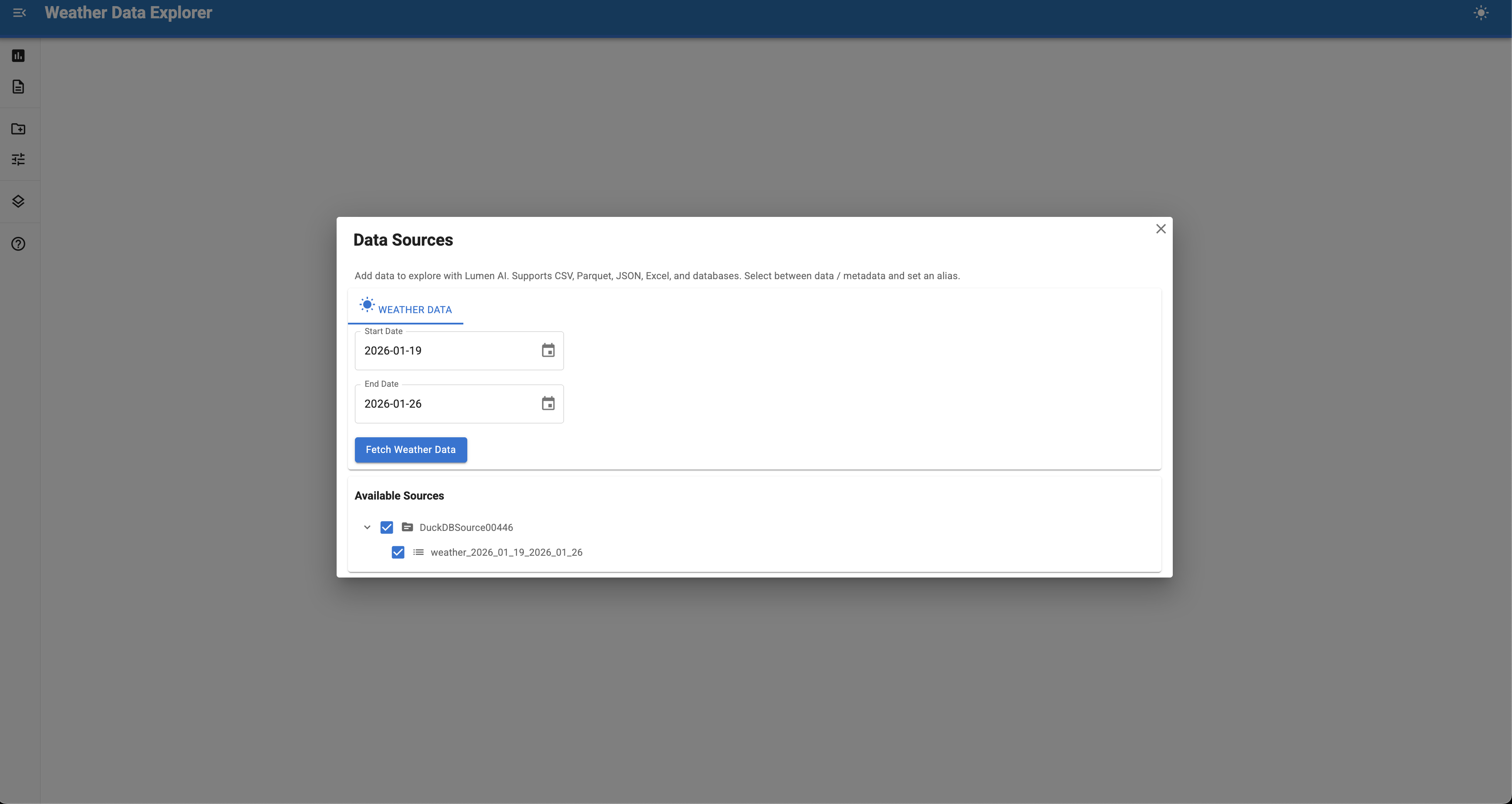
Source controls provide UI interfaces for loading data from external services.
Controls let users interactively fetch data from APIs, databases, or specialized sources directly in the Lumen UI sidebar. They're essential for integrating external data that isn't available as static files or database connections.
Why use source controls?
Source controls solve common data integration challenges:
- External APIs - Fetch data from REST APIs that require parameters or authentication
- User selection - Let users pick data subsets (years, regions, variables) before loading
- Dynamic data - Access real-time or frequently updated data sources
- Complex workflows - Handle multi-step data fetching and transformation
- Authentication - Manage API keys or credentials securely
Common use cases include:
- Financial data APIs (Federal Reserve, Yahoo Finance, etc.)
- Weather and climate data (NOAA, NASA, OpenWeather)
- Scientific datasets (genomics, astronomy, earth observation)
- Government portals (Census Bureau, Department of Labor)
- Internal corporate APIs and data warehouses
Built-in controls
Lumen ships with a set of built-in source controls:
| Control | Type | Use for |
|---|---|---|
UploadSourceControls |
Concrete | Uploading local files (CSV, Excel, etc.) |
DownloadSourceControls |
Concrete | Fetching data from URLs (including Kaggle datasets) |
CodeSourceControls |
Concrete | Wrapping Python functions or object methods as data sources |
URLSourceControls |
Base class | Fetching data from URL templates |
RESTAPISourceControls |
Base class | Defining REST API endpoints manually |
OpenAPISourceControls |
Concrete | Auto-discovering endpoints from an OpenAPI spec |
CatalogSourceControls |
Base class | Browsing and loading from a pre-fetched dataset catalog |
UploadSourceControls stages selected files before processing. After selecting files, click Upload file(s) to process them, or Clear selected to reset the staged selection. DownloadSourceControls uses the inherited label, Confirm file(s).
Both UploadSourceControls and DownloadSourceControls inherit from FileSourceControls, which classifies each file as either data or metadata:
- Data files (CSV, Parquet, Excel, GeoJSON, HTML, scientific formats, etc.) are parsed into DuckDB tables.
- Metadata files (
md,txt,yaml,yml,json,pdf,docx,doc,pptx,ppt) or files whose name contains_metadata,metadata_,readme, orschemaare added to the document vector store so the agent can retrieve their contents.
Extensions in both lists resolve to metadata, so a .json file is treated as metadata by default. For each file you can toggle between data and metadata, edit its table alias, and (for .xlsx files) pick the sheet to import.
Kaggle datasets
DownloadSourceControls can fetch datasets directly from Kaggle. Paste a Kaggle dataset URL into the URL input field:
Each file in the dataset becomes a separate table in the same data source. This also works through the agent — users can ask the AI to load a Kaggle dataset by providing the URL.
Requires the kagglehub package:
If kagglehub is not installed, the input placeholder stops advertising Kaggle URLs, and pasting one returns a message telling you to install the package.
Creating custom controls
Custom controls inherit from BaseSourceControls and override two hooks:
| Hook | Purpose |
|---|---|
_load() |
Main hook - fetch data and return a SourceResult |
_render_controls() |
Provide UI widgets (rendered above load button) |
The base class handles loading states, error display, progress, output registration, and event triggering automatically.
Minimal example
import asyncio

import param
import pandas as pd

import lumen.ai as lmai
from lumen.ai.controls import BaseSourceControls, SourceResult

from panel_material_ui import IntSlider, TextInput


class WeatherControl(BaseSourceControls):
    """Fetch weather data from an API."""

    station = param.String(default="NYC", doc="Weather station code in New York")
    year = param.Integer(default=2024, bounds=(2020, 2024))

    label = '<span class="material-icons">wb_sunny</span> Weather Data'
    load_button_label = "Fetch Weather"

    def _render_controls(self):
        """Provide widgets - rendered above the load button."""
        return [
            TextInput.from_param(self.param.station, label="Station", sizing_mode="stretch_width"),
            IntSlider.from_param(self.param.year, label="Year", sizing_mode="stretch_width"),
        ]

    async def _load(self) -> SourceResult:
        """Main hook - fetch data and return result."""
        self.progress("Fetching weather data...")

        url = (
            f"https://mesonet.agron.iastate.edu/cgi-bin/request/daily.py?"
            f"stations={self.station}&sts={self.year}-01-01&ets={self.year}-12-31&network=NY_ASOS&format=csv"
        )
        df = await asyncio.to_thread(pd.read_csv, url)
        if df.empty:
            return SourceResult.empty("No data returned")

        return SourceResult.from_dataframe(
            df,
            table_name=f"weather_{self.year}",
            year=self.year,
            source="mesonet_api",
            station=self.station,
        )


ui = lmai.ExplorerUI(source_controls=[WeatherControl])
ui.servable()
SourceResult
SourceResult is the return type for _load() with convenient factory methods:
# From a DataFrame (most common)
SourceResult.from_dataframe(df, "table_name", year=2023, source="api")

# From an existing DuckDB source
SourceResult.from_source(my_source, table="users")

# Empty result (no data loaded)
SourceResult.empty("No data returned from API")
Progress reporting
The self.progress() helper provides a simple API:
# Indeterminate (spinner)
self.progress("Loading metadata...")

# Determinate with percentage (0-100)
self.progress("Downloading...", value=50)

# Determinate with current/total (auto-calculates %)
self.progress("Downloading...", current=500, total=1000)

# Increment pattern for loops
self.progress("Processing files...", total=len(files))
for f in files:
    process(f)
    self.progress.increment()

# Clear progress
self.progress.clear()
Class attributes
Customize appearance with class attributes:
| Attribute | Default | Purpose |
|---|---|---|
label |
"" |
HTML label shown in sidebar |
load_button_label |
"Load Data" |
Button text |
load_button_icon |
"download" |
Material icon name |
load_mode |
"button" |
"button" or "manual" |
Manual load mode
For controls where loading is triggered by something other than a button (like clicking a table row), use load_mode="manual":
class CatalogBrowser(BaseSourceControls):
    """Browse and select from a catalog."""

    load_mode = "manual"  # No load button

    def __init__(self, **params):
        super().__init__(**params)
        self._layout.loading = True  # Show spinner during init
        pn.state.onload(self._load_catalog)

    def _render_controls(self):
        self._table = Tabulator(on_click=self._on_click, ...)
        return [self._table]

    def _load_catalog(self):
        self._table.value = fetch_catalog()
        self._layout.loading = False

    async def _on_click(self, event):
        # Use _run_load() for lifecycle management
        await self._run_load(self._fetch_row(event.row))

    async def _fetch_row(self, row_idx) -> SourceResult:
        self.progress("Downloading...")
        data = await download(row_idx)
        return SourceResult.from_dataframe(data, "selected_data")
Progressive disclosure and reactive updates
For complex controls, you may want to update options dynamically (e.g., changing the available years when a dataset is selected). Use param.depends with watch=True:
@param.depends("dataset", watch=True)
def _update_year_options(self):
    new_options = fetch_years_for_dataset(self.dataset)
    self._year_select.options = new_options
Best practices
- Use
asyncio.to_thread()for blocking API calls to avoid freezing the UI - Report progress with
self.progress()for long operations - Return
SourceResult.empty()with a message when no data is available - Add metadata to help LLM agents understand the data context
- Validate inputs before making expensive API calls
- Cache API responses when possible to avoid redundant calls
- Use
normalize_table_name()to ensure DuckDB-compatible table names
Catalog controls
CatalogSourceControls is a base class for controls that browse a pre-fetched catalog of datasets, letting users click a row to ingest that dataset. The SourceAgent can search and load entries from a natural-language query out of the box, using keyword matching over search_columns. Passing a vector_store embeds the entries in the background and upgrades that search to semantic matching.
Subclasses implement three methods:
| Method | Purpose |
|---|---|
_load_catalog() |
Fetch the catalog DataFrame once on session load |
_fetch_entry(entry) |
Download and process a single catalog entry, returning a SourceResult |
_entry_to_text(entry) |
(Optional) text representation used for vector embedding (defaults to joining search_columns) |
Class-level attributes configure the Tabulator browser:
| Attribute | Purpose |
|---|---|
display_columns |
{col: {"title": ..., "width": ..., "formatter": ...}} |
filter_columns |
{col: header_filter config} for column filtering |
search_columns |
Column names concatenated for vector embedding |
detail_columns |
Column names shown in the expanded row detail view |
Semantic search is enabled separately by passing a vector_store to the constructor, as with every other control.
The catalog is fetched via pn.state.onload, so these controls only populate inside a served Panel session (panel serve), not in a plain script or notebook.
import pandas as pd

from lumen.ai.controls import CatalogSourceControls, SourceResult
from lumen.util import normalize_table_name


class CensusCatalogControls(CatalogSourceControls):
    display_columns = {
        "name": {"title": "Dataset"},
        "year": {"title": "Year"},
    }
    search_columns = ["name", "description"]
    detail_columns = ["description", "url"]

    async def _load_catalog(self) -> pd.DataFrame:
        return await fetch_catalog()

    async def _fetch_entry(self, entry: pd.Series) -> SourceResult:
        df = await download(entry["url"])
        return SourceResult.from_dataframe(df, normalize_table_name(entry["name"]))
Agents ingest a dataset by searching the catalog via the control's tool exposed through as_tools().
Parametric controls
For common patterns like wrapping Python functions, fetching from URL templates, or calling REST endpoints, Lumen provides higher-level controls that handle widget generation automatically. These build on ParametricSourceControls, which renders widgets from function signatures or class-level parameters and exposes the same inputs to the SourceAgent.
CodeSourceControls
Wrap Python functions or object methods as data sources. Signatures are introspected to generate widgets automatically.
Pattern 1: Wrap standalone functions
from lumen.ai.controls import CodeSourceControls

def download_census_data(
    dataset: str = "acs/acs5",
    vintage: int = 2022,
    state: str = "*",
) -> pd.DataFrame:
    """Download Census data for US geographies."""
    import censusdis.data as ced
    return ced.download(dataset=dataset, vintage=vintage, state=state)

controls = CodeSourceControls(
    functions={"Download Census Data": download_census_data},
    table_name="census_data",
)
Pattern 2: Wrap object methods
from massive import RESTClient

client = RESTClient(api_key=os.environ["MASSIVE_API_KEY"])

controls = CodeSourceControls(
    instance=client,
    methods=["list_aggs", "get_last_trade", "get_ticker_details"],
    table_name="prices",
)
Customizing parameters with param_overrides
Replace auto-detected parameter types with custom widgets.
import param

controls = CodeSourceControls(
    instance=client,
    methods=["list_aggs"],
    param_overrides={
        "list_aggs": {
            # Full replacement with param.Selector
            "ticker": param.Selector(
                default="AAPL",
                objects=["AAPL", "MSFT", "NVDA", "GOOGL"],
            ),
            "timespan": param.Selector(
                default="day",
                objects=["minute", "hour", "day", "week"],
            ),
            # Dict merge for simple overrides
            "multiplier": {"default": 1, "bounds": (1, 100)},
            "limit": {"default": 5000, "bounds": (1, 50000)},
        },
    },
    skip_params=frozenset({"self", "cls", "return", "raw", "params"}),
)
| Parameter | Purpose |
|---|---|
instance |
Object whose methods to expose |
methods |
List of method names to expose |
functions |
Single callable or {name: callable} dict |
param_overrides |
{action_key: {param: override}} — action_key is the method name (or function/dict key); override is a param.Parameter or dict of kwargs |
skip_params |
Parameter names to exclude from UI |
table_name |
Default table name for results |
URLSourceControls
Subclass to fetch data from URL templates. Parameters declared as class attributes become UI widgets, and their values are interpolated into the URL.
import datetime
import param
from lumen.ai.controls import URLSourceControls

class MesonetDailyControls(URLSourceControls):
    """Fetch daily weather observations from Iowa Environmental Mesonet."""

    url_template = (
        "https://mesonet.agron.iastate.edu/cgi-bin/request/daily.py"
        "?stations={stations}&network={network}&sts={sts}&ets={ets}&format=csv"
    )

    stations = param.String(default="SEA", doc="Station identifier(s)")

    network = param.Selector(
        default="WA_ASOS",
        objects=["CA_ASOS", "IL_ASOS", "NY_ASOS", "WA_ASOS"],
    )

    sts = param.CalendarDate(
        default=datetime.date.today() - datetime.timedelta(days=7),
        doc="Start date",
    )

    ets = param.CalendarDate(
        default=datetime.date.today() - datetime.timedelta(days=1),
        doc="End date",
    )

    label = '<span class="material-icons">thermostat</span> Weather Data'
Preprocessing parameters
Override _fetch_data to transform user input before the URL is built:
class MesonetDailyControls(URLSourceControls):
    # ... params as above ...

    async def _fetch_data(self, action_name: str, **params) -> SourceResult:
        # IEM uses 3-letter FAA codes; strip ICAO 'K' prefix users often add
        raw = params.get("stations", "")
        params["stations"] = ",".join(
            s[1:] if len(s) == 4 and s.startswith("K") else s
            for s in (t.strip() for t in raw.split(","))
        )
        return await super()._fetch_data(action_name, **params)
| Class attribute | Purpose |
|---|---|
url_template |
URL with {param_name} placeholders |
| Class-level params | Become UI widgets; values interpolate into URL |
label |
HTML label in sidebar |
RESTAPISourceControls
RESTAPISourceControls exposes manually-defined REST API endpoints. Each endpoint is described with method, path, summary, description, and parameters, and the control builds a callable (rendered as widgets) for each one.
from lumen.ai.controls import RESTAPISourceControls

controls = RESTAPISourceControls(
    base_url="https://api.weather.gov",
    headers={"User-Agent": "MyApp/1.0"},
    endpoints={
        "Active Alerts": {
            "method": "get",
            "path": "/alerts/active",
            "description": "Fetch currently active alerts",
            "parameters": [
                {"name": "area", "in": "query", "type": "string",
                 "description": "State/territory code"},
                {"name": "status", "in": "query", "type": "string",
                 "enum": ["actual", "exercise", "test"], "default": "actual"},
            ],
        },
    },
)
| Parameter | Purpose |
|---|---|
base_url |
Root URL for all API requests |
headers |
Default HTTP headers sent with every request |
endpoints |
{display_name: endpoint_spec}; each spec has method, path, summary, description, parameters |
Endpoint parameters support enum (rendered as a dropdown), required, default, and description. The base class renders every parameter as a string; override _resolve_param_type() to map the type field onto real Python types, as OpenAPISourceControls does.
OpenAPISourceControls
OpenAPISourceControls fetches an OpenAPI 3.x spec on session load, resolves $ref references, and registers every path/method pair as an action, with no manual endpoint definitions needed. Like CatalogSourceControls, it fetches via pn.state.onload and so only populates under panel serve.
from lumen.ai.controls import OpenAPISourceControls

controls = OpenAPISourceControls(
    spec_url="https://api.weather.gov/openapi.json",
    headers={"User-Agent": "MyApp/1.0"},
    include_paths=["/alerts", "/points"],
    exclude_paths=["/icons"],
)
| Parameter | Purpose |
|---|---|
spec_url |
URL of the OpenAPI JSON spec |
include_paths |
Only include paths matching these prefixes |
exclude_paths |
Exclude paths matching these prefixes |
base_url |
(Optional) override the base URL from the spec |
For a full walkthrough see Building a Weather API Explorer.
Using with SourceAgent
When you pass source_controls to ExplorerUI, the SourceAgent can invoke them programmatically based on user queries:
from lumen.ai.agents import SourceAgent
from lumen.ai.ui import ExplorerUI

ui = ExplorerUI(
    agents=[SourceAgent()],
    source_controls=[MesonetDailyControls(), UploadSourceControls()],
)
The agent sees each control's actions as tools and can call them with appropriate parameters extracted from the user's question.
See also
- Building a Census Data Explorer — Complete walkthrough with BaseSourceControls
- Building a Weather Data Explorer — URLSourceControls tutorial with preprocessing
- Building a Weather API Explorer — OpenAPISourceControls tutorial with auto-discovered endpoints
- Building a Stock Market Data Explorer — CodeSourceControls tutorial wrapping a Python SDK