Palmer Penguins
Interactive dashboard exploring Palmer Station penguin measurements with linked selections.
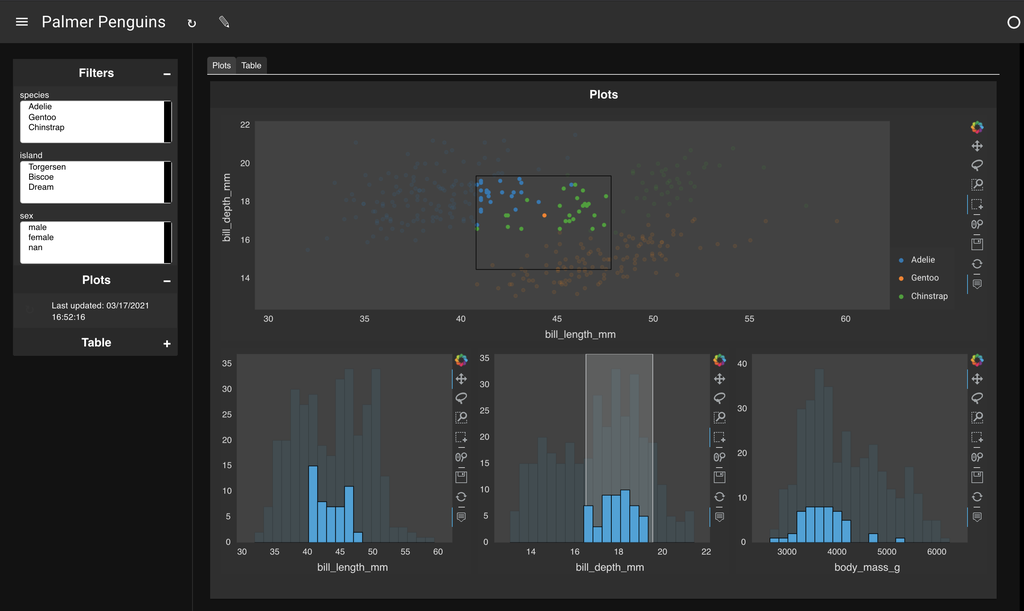
Features
- Linked selections - Select points in scatter plot to filter histograms
- Multiple filters - Species, island, and sex
- Interactive table - Shows selected data with pagination
YAML Specification
| penguins.yaml |
|---|
| config:
title: Palmer Penguins
theme: dark
layout: tabs
sources:
penguins:
type: file
cache_per_query: false
cache_dir: ./cache
tables:
penguins: https://datasets.holoviz.org/penguins/v1/penguins.csv
pipelines:
penguins:
source: penguins
table: penguins
filters:
species:
type: widget
field: species
island:
type: widget
field: island
sex:
type: widget
field: sex
selected:
pipeline: penguins
filters:
expr:
type: param
parameter: scatter.selection_expr
layouts:
- title: Plots
pipeline: penguins
views:
scatter:
type: hvplot
kind: points
x: bill_length_mm
y: bill_depth_mm
color: species
responsive: true
height: 350
selection_group: penguin
depth_hist:
type: hvplot
kind: hist
y: bill_length_mm
responsive: true
height: 350
selection_group: penguin
length_hist:
type: hvplot
kind: hist
y: bill_depth_mm
responsive: true
height: 350
selection_group: penguin
mass_hist:
type: hvplot
kind: hist
y: body_mass_g
responsive: true
height: 350
selection_group: penguin
layout: [[scatter], [depth_hist, length_hist, mass_hist]]
sizing_mode: stretch_width
- title: Table
pipeline: selected
views:
table:
type: table
layout: fit_data_fill
show_index: false
theme: midnight
sizing_mode: stretch_both
pagination: remote
page_size: 50
|
Run this example
Save the YAML above as penguins.yaml and run:
lumen serve penguins.yaml --show
Or explore with AI:
lumen-ai serve https://datasets.holoviz.org/penguins/v1/penguins.csv
Download YAML